|
Custom schedules |


|
|
Custom schedules |
|
A custom schedule is scheduling information that is unique for a site. UpdatePatrol supports both Custom Schedules and Shared Schedules, which are scheduling information shared between multiple sites (they will always be checked at the same time).
To specify a custom schedule for a site, select the Scheduling tab when adding or editing a site:
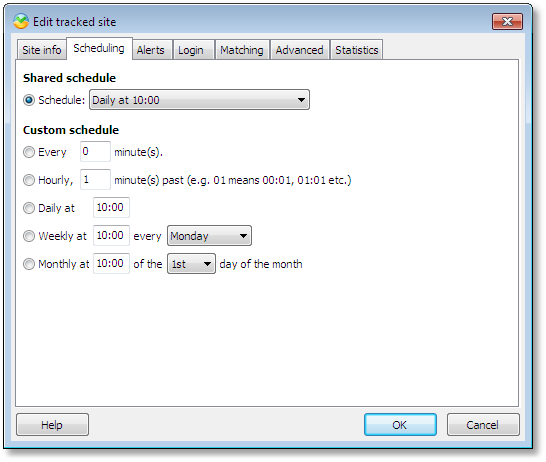
Select one of the options below the Custom schedule caption to enable the custom schedule.
You have 5 scheduling options:
| 1. | Check for changes every X minutes |
| 2. | Check for changes hourly. Specify at which minute past the hour to check, e.g. 10 for 1:10 am, 2:10 am etc. |
| 3. | Check for changes daily at a specified time. Specify hours and minutes, e.g. 14:00 for 2pm |
| 4. | Check for changes weekly at a specified time on a specific day of the week. |
| 5. | Check for changes monthly at a specified time on a specific day of the month. |
Click OK to save the changes.